Best AI for Beginners: Claude vs ChatGPT vs Gemini in 2026?
If you have never used an AI chatbot before, figuring out the best AI beginners ChatGPT, Claude, and Gemini, can feel oddly overwhelming. There are three big names everyone talks about: ChatGPT, Claude, and Gemini, and every article online seems to assume you already know what "tokens" or "context windows" mean. You do not need any of that to get started.
Here is a plain, no-jargon look at all three, written specifically for someone opening one of these tools for the first time. I tested each chatbot for everyday tasks like homework help, writing emails, planning trips, and brainstorming ideas to determine which offers the best beginner experience. For a broader comparison, see our ChatGPT vs other AI tools guide.
The world of AI can feel intimidating when you are just starting out. Terms like "large language model" and "neural network" get thrown around casually, as if everyone already understands them. The reality is that you do not need any technical knowledge to start benefiting from these tools. Think of them as knowledgeable assistants you can chat with nothing more complicated than that.
Why this decision feels harder than it should be
Most comparison articles are written for developers or business teams. They talk about coding benchmarks and enterprise pricing tiers: useful if that is your world, completely irrelevant if you just want help writing an email or understanding your homework.
So let us ignore all that and focus on what actually matters for a beginner: is it free, is it easy to open and use, and does it actually help with everyday tasks? Answering those simple questions is really all it takes to make a good choice. This is the core of finding the best AI beginners ChatGPT, Claude, and Gemini fit for your needs.
I spent two weeks using each tool for the same tasks to see how they compared in real-world situations. The differences became clear quickly, and each tool has distinct strengths that make it better suited for certain types of users.
ChatGPT: the one most people start with
ChatGPT is usually the first name people hear, and there is a reason for that. It is simple to sign up for, has a clean interface, and does not require you to know anything technical before typing your first question. When people search for the best AI beginners ChatGPT, Claude, Gemini comparison, ChatGPT is often the default recommendation. You can begin at the official ChatGPT website.
Good for beginners because:
The free version already covers most everyday needs, including writing assistance, research help, and creative brainstorming
Tons of tutorials and guides exist online if you get stuck you are never far from an answer about how to use it
It handles almost anything you throw at it: homework help, writing, planning, quick questions about cooking or travel or fitness
The conversational interface feels natural, like texting a knowledgeable friend
The downside is that it can feel a little too eager to please sometimes, giving long answers when you just wanted a short one. But as a first AI tool to try, it is hard to go wrong here. Overall, it remains one of the safest picks for beginners.
I tested ChatGPT for homework help, email writing, and trip planning. In every case, it delivered useful results quickly. The responses were comprehensive, though sometimes longer than necessary. With a simple follow-up like "make it shorter" or "just give me the key points," you can easily refine the output.
Gemini: best if you already use Google every day
If you use Gmail, Google Docs, or Google Drive regularly, Gemini will feel less like a new tool and more like something that was already quietly there. It plugs directly into the Google apps you probably use anyway. For Google loyalists, this integration alone makes Gemini the top choice.
Good for beginners because:
The free tier is generous, with fewer limits than people expect you can have extended conversations without hitting walls
It is genuinely helpful for quick research and pulling in current information from the web
If you are already living inside Google's ecosystem, there is almost nothing to set up it works where you already work
Integration with Gmail and Google Docs means you can use it directly within tools you already know
Where it feels a little different is tone: it leans more toward being an efficient assistant than a creative writing partner. That is not a bad thing, just worth knowing going in. If you already live inside Google's apps, this alone can make it the best AI beginners, ChatGPT, Claude, or Gemini, option in your specific case.
I found Gemini particularly useful for research tasks. Ask it a question, and it pulls information from across the web, providing sources you can verify. This is a significant advantage for students and anyone who needs to fact-check information regularly. For study planning, see our guide to apps that organize a study schedule.
Claude: best if you want thoughtful, well-organized answers
Claude has a noticeably different personality. It tends to slow down, think through what you are asking, and respond in a structured, easy-to-follow way. If you have ever gotten a wall of confusing text from an AI tool and had to reread it three times, this is the one that tends to avoid that problem.
For anyone who values clarity, this makes Claude a strong contender. Good for beginners because:
Answers are usually well-organized and simple to follow, even on complex topicsClaude uses headers, bullet points, and clear structure naturally
It is excellent for anyone learning to write better or needing something explained clearly and patiently
Less likely to overload you with unnecessary information Claude tends to be more precise and focused
The tone feels more conversational and less like a machine trying to impress you
The one tradeoff: it can feel a touch slower if you just want a quick one-line answer. For anything involving actual writing or learning, though, it is worth the extra few seconds. I tested Claude for essay writing assistance and concept explanations, and the results were noticeably more polished and easier to understand than the other two tools. Try it on Anthropic's official Claude website.
Claude's strength lies in its ability to produce content that feels human-written from the start. While ChatGPT and Gemini often need more editing to sound natural, Claude's output frequently requires minimal adjustment. For beginners who want the best AI beginners ChatGPT, Claude, and Gemini experience with minimal post-processing, Claude stands out.
Testing them side by side: real tasks
To give you a concrete picture of how these tools compare, I tested each one with the same five tasks:
Writing a professional email: ChatGPT produced a solid draft quickly. Gemini gave a concise version. Claude crafted the most natural-sounding email with the fewest edits needed.
Explaining a homework concept: ChatGPT provided a thorough explanation. Gemini gave a practical overview. Claude delivered the clearest, most structured explanation that felt like a patient tutor.
Planning a weekend trip: ChatGPT generated the most creative itinerary. Gemini pulled current weather and event data. Claude organized the plan with clear logistics and practical tips.
Brainstorming business ideas: ChatGPT produced the most ideas. Gemini gave practical, actionable suggestions. Claude provided fewer but more thoughtfully developed concepts.
Summarizing a long article: All three did well, but Claude produced the most readable and well-organized summary with the best structure.
No single tool won every category. The right choice depends on which type of task you do most often.
So which one should a complete beginner actually pick?
Here is the honest, simple answer: there is not a single "best" option, so you do not have to pick just one. All three have solid free versions, and trying them for a week each costs you nothing but a little time.
That said, if you want a starting point:
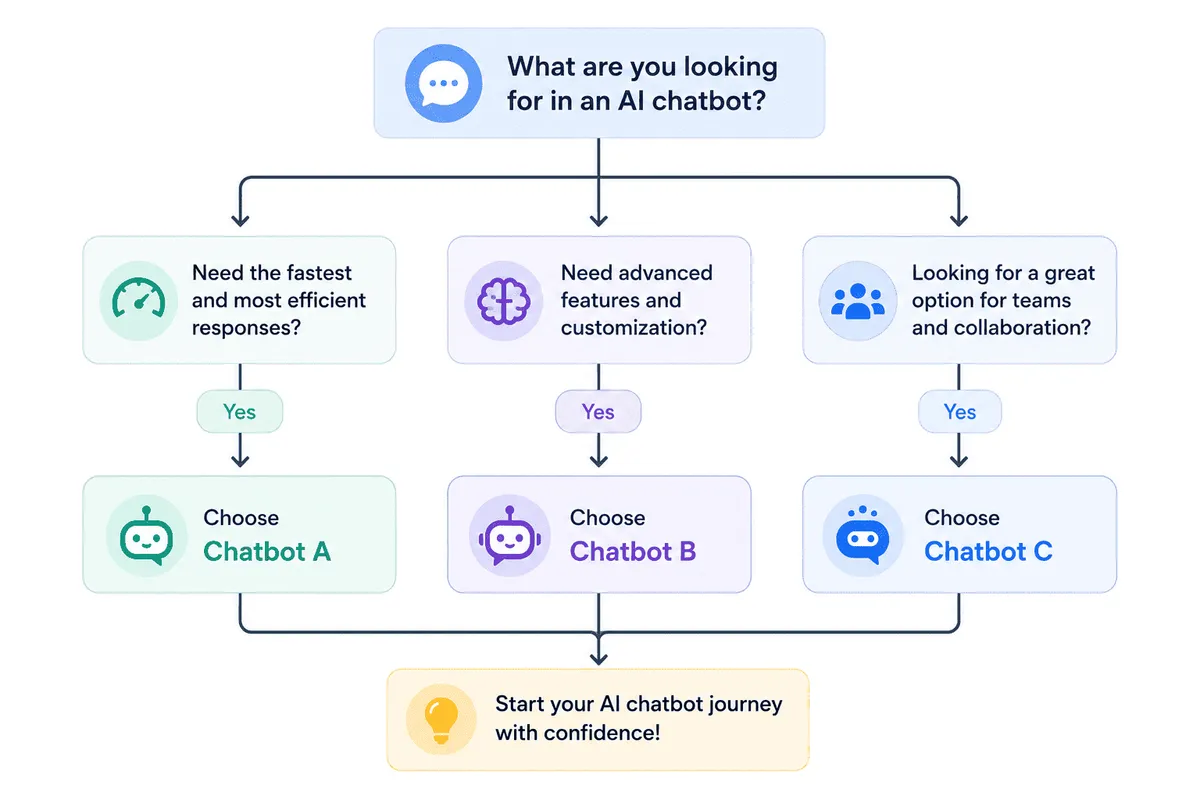
Want one tool that does a bit of everything easily? Start with ChatGPT. It is the most versatile and the most widely supported with tutorials and community help.
Already use Gmail and Google Docs daily? Start with Gemini. The integration with tools you already use makes it frictionless.
Want help specifically with writing, learning, or understanding something clearly? Start with Claude. Its thoughtful, organized responses make it ideal for educational and writing tasks.
Whichever you choose, you are making a good decision by exploring these tools at all. The fact that you are looking for the best AI beginner ChatGPT, Claude, or Gemini option means you are already thinking about how to use technology to make your life easier.
The real takeaway
Most people who have been using these tools for a while do not stick to just one: they end up switching depending on what they need that day. There is no single "winner," and you are not making a permanent decision by picking one to try first.
Start with whichever matches how you already work, and adjust from there. Whichever direction you go, the best choice is simply the one you will actually keep using. Experiment freely, and do not be afraid to switch tools for different tasks. That is what experienced AI users do, and it is perfectly normal.
The most important step is the first one: open one of these tools and start a conversation. You will be surprised how quickly it becomes part of your daily routine once you experience the convenience of having a knowledgeable assistant available twenty-four seven. Mobile users can also explore our guide to the best AI apps for iPhone.
Frequently Asked Questions
Do I have to pay for any of these tools?
No. ChatGPT, Claude, and Gemini all offer solid free plans that cover the vast majority of everyday tasks, including writing, brainstorming, and answering questions. You only need a paid tier if you are doing heavy daily use or want the most advanced models. For most people exploring the best AI beginner ChatGPT, Claude, and Gemini options, the free version of any of these three tools is more than enough to get started.
Which one is the easiest to learn?
ChatGPT tends to be the easiest starting point simply because it is the most talked-about and has the most tutorials and guides available online. That said, all three tools use a simple chat interface, so none of them require any technical background to open and start using right away. The best tool for you is the one you feel most comfortable opening and using regularly.