AI Image Generator for Beginners
AI image generation has gone from a niche technology to a mainstream creative tool in just a few years. Whether you want to create social media graphics, blog illustrations, or concept art, or simply explore your creativity, an AI image generator for beginners can help you produce stunning visuals without any design experience or artistic skills.
The concept is simple: you describe what you want in text, and the AI creates an image based on your description. While that sounds almost too easy, there are nuances to writing effective prompts and understanding what these tools can and cannot do. This beginner-friendly guide walks you through everything you need to know to start creating images with AI, from understanding how the technology works to writing prompts that produce exactly what you envision.
What Is an AI Image Generator?
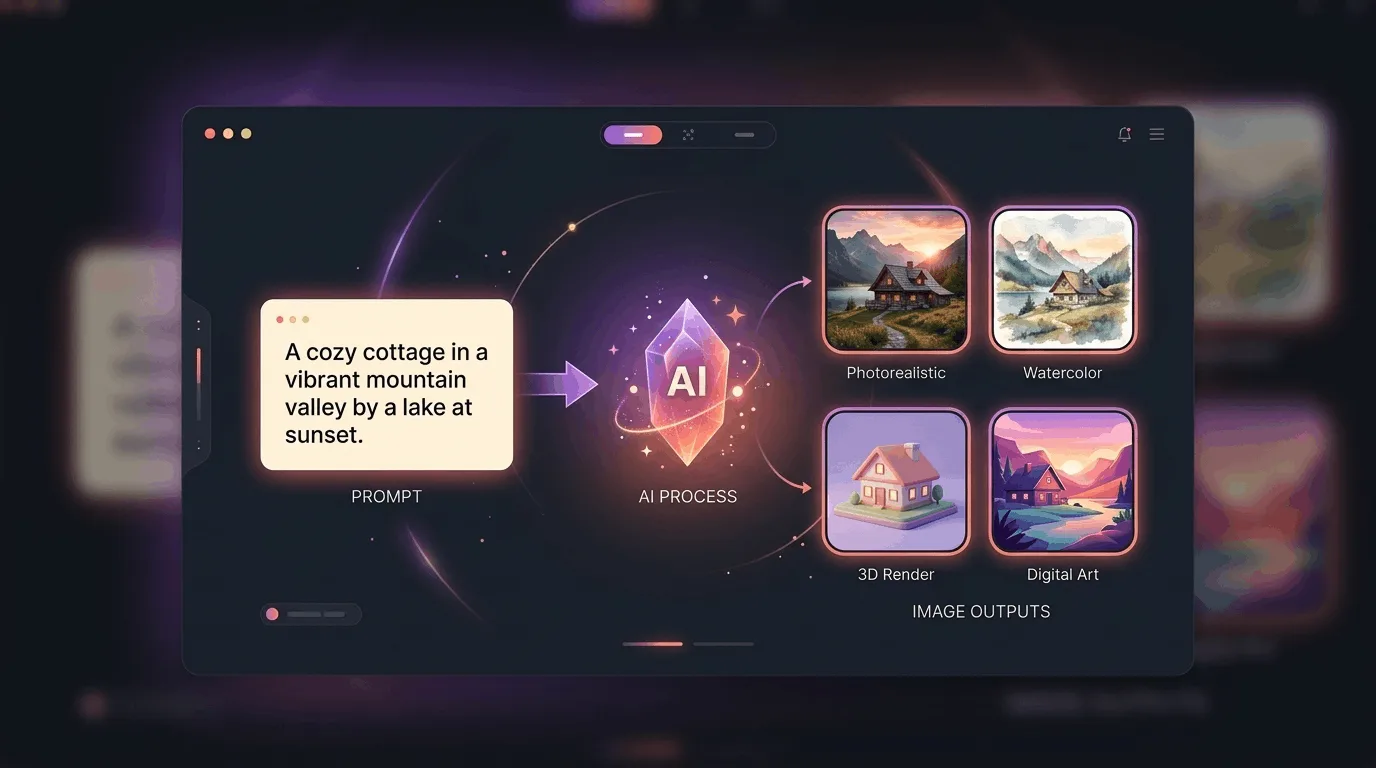
An AI image generator is a tool that creates images from text descriptions. You type a prompt describing the image you want, and the AI generates a picture that matches your description. For example:
“A cozy cabin in a snowy forest at sunset, warm lights glowing from the windows, photorealistic style.”
Within seconds, the AI produces one or more images that match that concept. The first time you see it work, it genuinely feels like magic. An AI image generator for beginners requires no artistic training, no expensive software, and no technical knowledge. Just an idea and the willingness to experiment.
How Does AI Image Generation Work?
You do not need to understand the technical details to use an AI image generator effectively, but knowing the basics helps you write better prompts and set realistic expectations.
These AI models are trained on millions of image-text pairs. When you provide a description, the AI does not copy an existing image. Instead, it generates a completely new image based on patterns it learned during training. It understands relationships between words and visual concepts, allowing it to translate your text description into a coherent image.
This is why the quality of your prompt matters so much. The more specific and descriptive your prompt, the better the AI can understand what you want and produce an image that matches your vision. Learning to write effective prompts is the single most important skill when using an AI image generator for beginners.
Getting Started: What You Need
Starting with an AI image generator is easier than you think. Here is what you need:
An AI image generator tool: DALL-E, Midjourney, Stable Diffusion, or other platforms. If you are new to AI tools in general, check out our guide on best AI for beginners to understand how these platforms work.
An idea in your head: A concept, scene, or visual you want to create
Willingness to experiment: Prompt engineering is a skill that improves with practice
Most AI image generators have free tiers or trial periods, so you can start experimenting without spending any money. This makes it easy to explore different tools and find the one that works best for your creative style.
Writing Effective Prompts
The quality of your generated images depends heavily on how you write your prompts. Think of your prompt as instructions for the AI. The clearer and more specific your instructions, the better the result. A strong prompt typically includes several key elements:
Subject: What is the main focus of the image? (a dog, a cityscape, a person)
Setting: Where is the scene taking place? (in a forest, on a beach, in a studio)
Style: What visual style do you want? (photorealistic, watercolor, oil painting, 3D render)
Mood or lighting: What atmosphere should the image convey? (warm, dramatic, soft, moody)
Details: Any specific elements you want included? (sunset lighting, vintage camera, red scarf)
For example, compare these two prompts:
“A golden retriever running through a field at sunset, soft focus, warm golden light, photorealistic style.”
“dog”
The first prompt gives the AI clear direction, resulting in a specific, high-quality image. The second prompt is too vague, and the AI will generate something generic. Mastering prompt structure is what separates frustrating results from impressive ones when using an AI image generator for beginners.
Troubleshooting Common Issues
AI image generators are impressive, but they are not perfect. Here are common issues beginners encounter and how to fix them:
Weird hands or extra fingers: This is a known limitation. Try rephrasing your prompt or adding "correct hand anatomy" as a descriptor.
Missing details: If the AI omits something important, mention it more prominently in your prompt or add emphasis with specific adjectives.
Image does not match the prompt: Simplify your prompt and focus on the most important elements. Too many details can confuse the AI.
Low quality output: Some platforms offer quality settings. Select the highest quality option for the best results.
Prompting is a skill that improves with practice. Do not get discouraged if your first few attempts are not perfect. Each generation teaches you something about how the AI interprets language.
Tips for Better Results
These practical tips will help you get the most out of any AI image generator for beginners:
Be specific but not overwhelming: Include the most important details without writing a novel. Aim for 20-40 words per prompt.
Use reference styles: Mention specific artists, art movements, or photography styles to guide the AI. For example, "in the style of Studio Ghibli" or "National Geographic photography style."
Iterate on your prompts: Generate multiple versions and refine your prompt based on what works and what does not.
Negative prompts: Some platforms let you specify what you do not want in the image. Use this to exclude unwanted elements.
Generate multiple variations: Most tools create several images per prompt. Review all options and select the best one.
What Can You Create with AI Image Generators?
The applications for AI-generated images are vast and growing. Here are some popular use cases:
Social media content: Create unique graphics for Instagram, Twitter, and LinkedIn posts. Pair these visuals with the right captions using our guide on AI tools for social media posts for a complete content strategy.
Blog headers and illustrations: Design custom featured images for your articles. Combine these visuals with strong writing using our roundup of best AI tools for content writing to complete your content workflow.
YouTube thumbnails: Generate eye-catching thumbnails that attract viewers
Presentations: Add professional visuals to your slides without stock photo subscriptions
Personal projects: Create art for your home, gifts for friends, or visual concepts for creative projects
Marketing materials: Design ads, banners, and promotional graphics quickly
An AI image generator for beginners opens up creative possibilities that previously required expensive design software or hiring a professional designer.
Understanding AI Image Generator Limitations
While AI image generators are powerful, it is important to understand their limitations:
They do not truly understand content: AI generates images based on patterns, not genuine comprehension. This sometimes leads to illogical or inconsistent results.
Complex scenes can be challenging: Images with multiple interacting subjects or intricate details may not come out as expected.
Text in images is often garbled: Most AI generators struggle to render readable text within images.
Consistency is not guaranteed: Generating the same image twice may produce different results, which can be frustrating for specific projects.
Think of an AI image generator as a creative assistant, not a perfect production tool. It excels at brainstorming, concepting, and producing drafts that you can refine or use as inspiration.
Common Beginner Mistakes
Avoid these pitfalls that most newcomers encounter when using an AI image generator for beginners:
Being too vague: Generic prompts produce generic images. Add specific details about subject, style, and mood.
Expecting perfection on the first try: Great results often require multiple attempts and prompt refinement.
Writing overly long prompts: Very detailed prompts can confuse the AI. Focus on the most important elements.
Giving up too early: The learning curve is gentle but real. Your tenth prompt will be much better than your first.
Not experimenting with styles: Trying different artistic styles is one of the most rewarding aspects of AI image generation.
Final Thoughts
An AI image generator for beginners is one of the most exciting creative tools available today. You do not need artistic skills, design software, or years of training to create stunning images. All you need is an idea, a willingness to experiment, and the patience to refine your prompts.
Start with simple prompts, explore different styles, and do not be afraid to iterate. The technology is improving rapidly, and the images you can create today would have been impossible just a year ago. Dive in, have fun, and let your creativity guide the process.
Frequently Asked Questions
What is the best AI image generator for beginners?
DALL-E (accessible through ChatGPT) is widely considered the most beginner-friendly due to its simple interface and natural language prompts. Midjourney produces the most aesthetically pleasing images but requires Discord. Stable Diffusion offers the most flexibility but has a steeper learning curve. Try two or three to see which matches your creative style.
Are AI-generated images free to use?
This depends on the platform and your subscription level. Most AI image generators grant you ownership of images created on their platform, but usage rights vary. For commercial use, always review the terms of service for your specific platform. Many tools on free tiers restrict commercial usage of generated images.